

Have you ever poured your heart into an amazing article, hit publish, and been met with silence? It’s a deeply frustrating experience. Your content feels like an island, isolated and unseen. This often happens when we chase links from other sites but forget the powerful connections we can build right at home. A thoughtful internal linking strategy is the bridge that connects those islands. It ensures every piece of your work gets the attention it deserves from both readers and search engines.
Simply put, an internal link is a hyperlink from one page on your site to another. This fundamental action is one of the most impactful yet overlooked tactics in search engine optimization. When done right, it provides a clear roadmap for Google. Consequently, this helps clarify your site’s structure, pass authority to important pages, and dramatically improve your visitor’s journey.
Did you know the concept of passing authority through links dates back to Google’s very origins? The PageRank algorithm treated a link from page A to page B as a ‘vote’ for page B. While this core idea remains, modern SEO has evolved. Today, search engines also analyze the context of these links to understand topical relationships. Building a smart web of internal links, therefore, doesn’t just pass authority; it establishes you as an expert on a specific subject, creating powerful topic clusters.
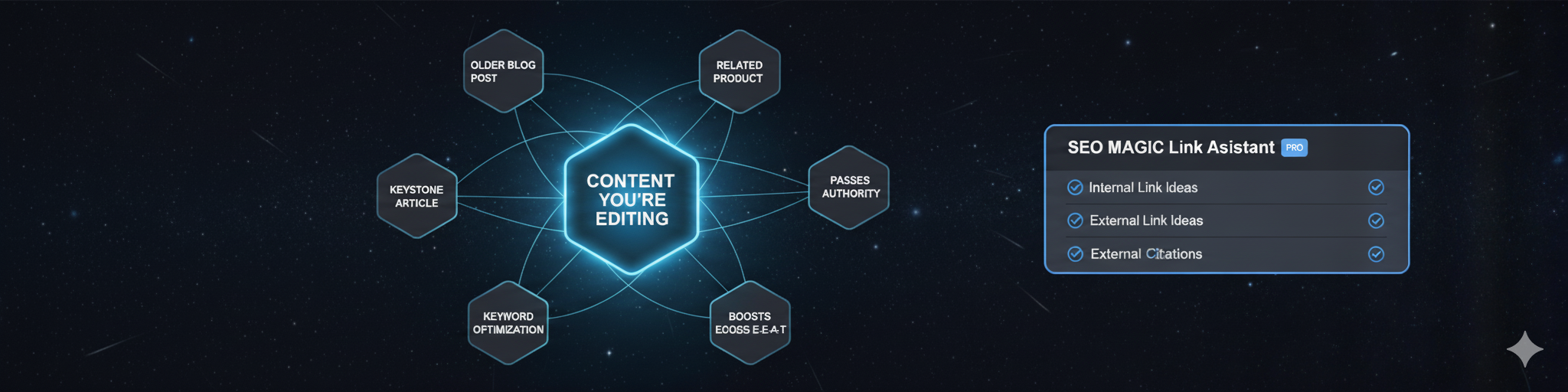
How a Smart Linking Structure Transforms Your SEO
A strong network of internal links achieves several critical goals for your website. It acts as the backbone of your on-page SEO, transforming individual pages into a powerful, cohesive whole. Let’s explore how this strategy directly boosts your site’s performance and visibility.
1. Elevate User Experience and Engagement
Effective internal links are a service to your reader. They guide visitors to relevant, helpful information exactly when they need it. For instance, a person reading about ‘Choosing an SEO Plugin’ would find a link to a guide on ‘Writing Meta Descriptions’ extremely useful. This action keeps them on your site longer, which reduces your bounce rate. In addition, it sends strong positive signals to Google that your website provides significant value.
2. Distribute Link Authority Across Your Site
Imagine your homepage earns a valuable backlink from a major website. That page now holds significant ranking power, often called ‘link equity.’ By linking from that powerful page to a newer blog post, you pass along some of that authority. This process helps the new post get indexed and rank much faster. Without that internal connection, your new content would be starting from scratch with no support from your stronger pages.
3. Guide Search Engines for Faster Indexing
Google’s crawlers, known as Googlebots, discover new content primarily by following links. If you publish a page but fail to link to it from your existing content, it becomes an ‘orphan page.’ As a result, Google will struggle to find, crawl, and ultimately show it in search results. A well-connected site functions like a spider’s web. It allows Googlebots to move effortlessly from one page to another, discovering all your content.
The Manual Linking Trap: Why Your Best Content Gets Lost
The theory is simple. When you publish a new article, you should add links to it from relevant older posts. At the same time, your new post should link out to other helpful pages on your site. Unfortunately, this is where the strategy often fails for most website owners. Executing this process by hand is a tremendous amount of tedious work.
You face a time-consuming and frustrating cycle that is easy to ignore:
- How do you find the most relevant old posts?
- Do you remember that one article you wrote two years ago that’s a perfect match?
- How do you find high-quality external links to cite, to improve your E-E-A-T (Experience, Expertise, Authoritativeness, Trust)?
Searching your own site with commands like site:yoursite.com "keyword" is a possible start. However, you must then open and edit five to ten old articles for every single new one. This workflow is highly inefficient and unsustainable. Consequently, most people simply give up and skip this crucial SEO step entirely, leaving their content disconnected.
The Solution: Weave a Powerful Site Architecture in Seconds
Instead of battling with manual searches, you can leverage artificial intelligence to do the heavy lifting. Why spend thirty minutes hunting for linking opportunities when you can uncover the best options in just a few moments? You can finally build the powerful site architecture you need without the manual grind.
The Link Assistant (PRO) module in SEO Magic was designed specifically for this challenge. It integrates directly into your WordPress workflow. As you write, the Link Assistant analyzes your text in real-time. It then automatically suggests relevant pages on your site to link to, displaying them right inside the editor.
The tool’s capabilities go beyond just suggesting internal links. The Link Assistant helps you accomplish two essential tasks with ease:
- Internal Link Suggestions: It scans your existing posts and pages to find the most relevant content on your own site to link to, ensuring you never create an orphan page again.
- External Link Suggestions: To boost your site’s authority and E-E-A-T, you should link out to other high-authority sources. The Link Assistant uses the Google Search API to suggest relevant, high-authority external links that you can add to your content.
Connect Your Content, Connect With Your Audience
Your hard work deserves to be seen. Stop letting your best articles fade into obscurity. A deliberate internal linking strategy is your most accessible and powerful SEO win. It ensures authority flows through your site, helps Google discover your content faster, and keeps readers captivated. You poured your expertise into every word; now it’s time to connect the dots and build a website that truly works for you.
Instead of guessing or spending hours lost in old posts, you can build a powerful, interconnected site with confidence. Try SEO Magic PRO and let the Link Assistant weave your articles into a robust web of content that both Google and your audience will love.
Unlock Your Website’s Potential: Internal Linking FAQs
What is internal linking and why is it important for SEO?
Internal linking is the practice of linking from one page on your website to another. It is crucial for SEO because it helps search engines understand your site structure, distribute link authority, and improve user navigation.
How does internal linking help Google find and index my content?
Google’s crawlers follow links to discover pages. Your internal links create a roadmap, making it easy for Google to crawl and index all your content. This ensures your pages can appear in search results.
How can I simplify the process of building internal links?
Tools like SEO Magic PRO’s Link Assistant can automate the process. They analyze your content as you write and suggest relevant internal links. This saves significant time while improving your website’s SEO.