 Skip to content
Imagine owning a sports car but having to pay a toll every time you shift gears. That is exactly how most AI SEO tools treat you today. You are in the flow, optimizing your site, momentum is high, and suddenly—silence. “Insufficient credits.”
It is the ultimate buzzkill for digital marketers. You are forced to pull out your credit card or pause your work until the billing cycle resets, just to write a few product descriptions. It feels restrictive because it is. But what if you could bypass the middleman entirely?
In this guide, I will show you how to leverage Google Gemini + WordPress to build a robust, unlimited AI SEO workflow that puts you back in the driver’s seat.
- doesn’t lock you into expensive per-token plans,
- keeps you in full control of your data and content,
- and actually saves time across metadata, content, images and products.
I will use SEO Magic, my specialized AI SEO assistant for WordPress, as the practical example. However, these concepts apply to any “bring your own API key” strategy that liberates you from per-token pricing.
Why Most AI SEO Tools Feel Like a Trap
Many AI SEO tools look incredible on the surface. They offer slick dashboards, colorful graphs, and the promise of instant rankings with a single click.
- One-click meta descriptions
- Headlines and blog post ideas
- Image alt text generators
- Internal link suggestions
But peek behind the sleek user interface, and you will usually find the same restrictive business model:
“We pay OpenAI or another provider, and you pay us per token / per credit / per project.”
This creates several critical problems for serious publishers and agencies:
- You never know how much it will cost next month.
- You’re stuck inside someone else’s platform and pricing decisions.
- If you run multiple sites, credits evaporate quickly.
- You never truly own the workflow—if the SaaS dies, your process dies with it.
That precise frustration is what pushed me to build an alternative approach—one that respects your budget, your data privacy, and your autonomy.
A Different Model: Bring Your Own Gemini API Key
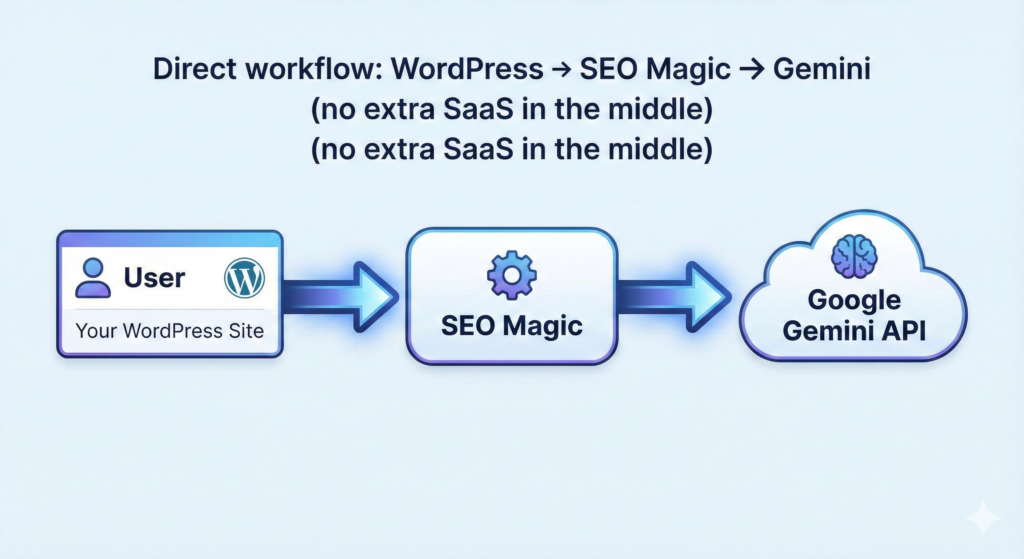
Instead of paying a third-party SaaS a premium for every prompt you send, you can simply cut out the middleman.
- Create your own Google Gemini API key in your Google Cloud project.
- Connect that key directly to your WordPress site.
- Use AI from inside your WP admin, without an extra “middleman” charging per token.
With this model, the dynamics change completely:
- You talk directly to Google’s Gemini models.
- You can take advantage of free tiers or low-cost usage at the platform level, not through a markup.
- If you don’t send prompts, you don’t pay anything extra.
- You can move your key between projects and websites whenever you want.
SEO Magic is engineered exactly around this philosophy:
You bring your Gemini key. The plugin brings the workflows.
What Makes Gemini a Great Fit for SEO Workflows?
While you can use various Large Language Models (LLMs) for SEO tasks, the Gemini API for WordPress SEO offers distinct advantages that shine in Content Management System environments:
- Fast models for bulk tasks
Perfect for generating lots of meta descriptions, alt text, or product copy in one go. - Strong understanding of context
Gemini is good at reading long pages and preserving the structure and intent of your content. - Multilingual
If you run sites in Spanish, English or other languages, you can generate localized SEO content using one integration. - Flexible prompts
You can build very specific “editor-in-chief” style prompts for metadata, blog posts, WooCommerce products, FAQs, etc.
Did you know? Google Gemini is natively multimodal. Unlike older models that only process text, Gemini can “see” images and understand video content directly. This makes it exceptionally powerful for generating accurate Image Alt Text without needing complex third-party vision tools.
Historical Note: Gemini represents the evolution of Google’s DeepMind research. DeepMind, acquired by Google in 2014, is the same team behind AlphaGo. Their goal with Gemini was to create a model that doesn’t just read text but understands the world through multiple senses—vision, audio, and code—simultaneously.
When you combine that power with a plugin like SEO Magic, you unlock workflows such as:
- “Generate titles & descriptions for all posts missing metadata.”
- “Fix alt text on all product images that are empty.”
- “Rewrite this article in a more engaging, SEO-friendly way without changing the core message.”
Step-by-Step: Setting Up a Gemini-Based SEO Workflow in WordPress
Let’s walk through a realistic setup using SEO Magic. This process will grant you direct access to Google’s AI infrastructure.
1. Create Your Gemini API Key
- Go to your Google Cloud Console.
- Enable the Gemini / Generative AI API (if it’s not already enabled).
- Create an API key and store it somewhere safe.
- Check Google’s documentation for any free tier or usage limits available to your account.
Tip: SEO Magic doesn’t send anything to external servers for AI content.
The API key stays in your WordPress site and requests go directly from your server to Google.
2. Install and Activate SEO Magic in WordPress
- In your WP admin, go to Plugins → Add New → Upload Plugin.
- Upload the
seo-magico.zipfile. - Click Install Now and then Activate.
- You’ll see a new menu item called SEO Magic in your admin sidebar.
(Note: If you are using the free version from WordPress.org, you can seamlessly upgrade to PRO later with a license key.)
3. Connect Your Gemini API Key
- Go to SEO Magic → AI Settings.
- Paste your Gemini API key into the field provided.
- Choose your default model (for example, a fast “flash” model for bulk tasks).
- Save changes and run a quick test from the settings page.
From this point on, all AI features in SEO Magic will utilize your own Gemini key. Say goodbye to extra credits and opaque “AI usage” invoices.
Practical Use Cases: Where AI Actually Helps With SEO
Let’s look at how to deploy this setup in your daily work without turning your site into a farm of robotic spam.
1. Metadata SEO: Titles & Descriptions at Scale
Inside SEO Magic → Metadata SEO, you can automate the tedious parts of optimization:
- See a table of your posts, pages and custom post types.
- Quickly find items missing SEO titles or meta descriptions.
- Ask Gemini to propose title + description combinations.
Best Practices for Metadata:
- Keep your brand voice consistent by configuring the plugin’s global settings (tone, style, language).
- Review every suggestion before saving—you are the editor-in-chief.
- Use AI to do the boring part (first draft), not the final decision.
2. Image SEO: Alt Text That Isn’t Just Keyword Stuffing
In the Multimedia SEO section, SEO Magic leverages Gemini’s vision capabilities to:
- Scan your media library and detect images without alt text, titles or captions.
- Use Gemini to generate descriptive alt text that follows accessibility best practices (WCAG-style descriptions).
The Benefits:
- Better accessibility for screen readers.
- More context for Google Images.
- No more “1234-final-final.jpg” as the only information.
3. Content Assistant: Improve Existing Articles
Instead of asking AI to write generic blog posts from scratch, use it to refine what you already have:
- Open Content Assistant.
- Load an existing post from your site.
- Let Gemini:
- Suggest a clearer structure (H2/H3).
- Improve introductions and conclusions.
- Rewrite paragraphs to be more engaging and readable.
- Propose FAQs and schema ideas.
This approach is significantly safer for SEO because:
- You start from your content (your expertise, your experience).
- The AI acts as a senior editor, not as a random content farm.
4. WooCommerce SEO: Product Copy That Sells
If you run an online store, SEO Magic’s WooCommerce assistant becomes your 24/7 copywriter:
- Clear product titles that include the right keywords.
- Long descriptions that focus on benefits, not just features.
- Short descriptions that behave like “elevator pitches” for conversion.
You can configure the prompts so that Gemini focuses on conversion psychology:
- Emphasizes pain points and outcomes.
- Respects your brand voice.
- Avoids over-promising or misleading language.
WooCommerce powers over 3.9 million online stores, making it the most popular e-commerce platform on the web. It started in 2011 as a fork of JigoShop. Its open-source nature makes it the perfect candidate for this “Bring Your Own Key” strategy, giving store owners total control over their data and costs.
How to Use AI for SEO Without Hurting Your Rankings
AI is a powerful accelerator, but it can damage your site’s reputation if you automate blindly. Google rewards helpful, human-first content.
Here are the ground rules for staying safe:
1. Always Edit Before Publishing
Never trust AI outputs 100%. Always review for:
- Factual accuracy
- Brand voice consistency
- Over-optimization (keyword stuffing)
- Generic or repetitive phrases
2. Don’t Mass-Generate Thin Content
Google is very clear: low-quality content is penalized regardless of how it was produced.
Do use Gemini to:
- Improve and enrich existing pages.
- Add missing metadata and alt text.
- Suggest structure and internal links.
Don’t use it to:
- Generate hundreds of low-value articles just to rank.
- Rewrite scraped content from other websites.
3. Keep E-E-A-T in Mind
Even with AI assistance, your site must demonstrate Experience, Expertise, Authoritativeness, and Trustworthiness:
- Experience: real use cases, screenshots, your own examples.
- Expertise: insights that a generic model wouldn’t invent alone.
- Authoritativeness: clear author profiles, references, external links.
- Trustworthiness: honest claims, correct data, transparent policies.
Remember: AI is a tool to articulate your expertise, not a substitute for having it.
The Big Advantage: Predictable Costs
By using your own Gemini key, you unlock financial predictability:
- You don’t pay per “credit” inside a SaaS dashboard.
- You can monitor usage directly in your Google Cloud account.
- You’re free to switch models, adjust quotas, or stop usage at any time.
From a business perspective, this means:
- More control over margins if you run an agency.
- No surprise bills just because you optimized a big WooCommerce catalog.
- The freedom to experiment with prompts and workflows without thinking “this click costs me X credits”.
Final Thoughts: Build Your Own AI SEO Stack
If you are tired of black-box tools and anxiety over credit limits, building your own stack with Gemini + WordPress is the most sustainable path forward.
With SEO Magic, the philosophy is simple:
- Use your own Gemini API key.
- Run AI SEO workflows directly in WordPress.
- Keep yourself in the loop as the human editor.
- Avoid monthly surprises and per-token traps.
If that sounds like the kind of control you need, you have two options:
- Try SEO Magic on your WordPress site and connect your Gemini key.
- Start with metadata, images and one or two key articles.
- Once you’re comfortable, expand to WooCommerce products and autopilot tasks.
SEO is a marathon, not a sprint, and you shouldn’t be penalized for running faster. The more control you have over your tools and costs, the more effective your strategy becomes. It is time to make your SEO truly effortless.
Frequently asked questions about Gemini SEO workflows
How does using a personal Google Gemini API key reduce SEO costs?
By connecting directly to Google, you eliminate the markup fees charged by third-party SaaS platforms that use a credit system. You only pay standard API rates, often leveraging generous free tiers, which significantly lowers expenses for high-volume content generation.
What is required to connect Google Gemini to a WordPress site?
You simply need to create an API key in the Google Cloud Console and paste it into a compatible WordPress plugin like SEO Magic. This establishes a secure link that allows you to run AI commands directly from your admin dashboard without complex coding.
Can Gemini automatically generate accurate alt text for website images?
Yes, unlike older text-only models, Gemini is multimodal and can visually analyze images to understand their context. This capability enables it to write precise, descriptive alt text for your media library without needing additional vision software or manual input.
What are the privacy benefits of using a direct API key integration?
Using your own key means your data travels directly between your server and Google without passing through an intermediary SaaS provider. This architecture prevents third-party platforms from harvesting your data and ensures your workflow remains functional regardless of other companies’ business changes.
Which SEO tasks are best suited for automation with Gemini?
This model excels at high-volume tasks such as writing meta descriptions, fixing missing product data in WooCommerce, and translating content. It is also highly effective for rewriting existing articles to improve engagement or tone while preserving the original structure and intent.