

Have you ever crafted the perfect blog post, only to watch it vanish into the depths of Google’s search results? It’s a deeply frustrating experience. You follow all the content rules, but an invisible ceiling seems to cap your growth. That unseen barrier is often a weak technical foundation, and this guide provides the blueprint for powerful technical SEO optimization.
Imagine your website as a magnificent house. Your content furnishes the rooms beautifully, and your backlinks are the roads leading to your door. However, if the foundation is cracked and the wiring is faulty, no one will want to stay for long. Technical SEO is that critical foundation. It covers all the backend work that allows search engines to discover, understand, and ultimately reward your website. Together, let’s strengthen that framework for lasting success.
1. Mastering Crawlability and Indexing
For Google to rank your content, its web crawlers need a clear path. First, they must discover your pages. Then, they add them to a massive digital library, a process called indexing. Your primary mission is to make this journey effortless for search engine bots. A clear pathway ensures they see and store every valuable piece of content you create.
Did you know the `robots.txt` file, a cornerstone of crawler management, was born from an accident? In 1994, developer Martijn Koster unintentionally released a faulty bot that overwhelmed a server. In response, he proposed a simple standard for websites to voluntarily block crawlers from certain areas. This foundational concept of technical SEO remains essential today.
Another key innovation came in 2005 when Google introduced Sitemaps. Initially, this allowed webmasters to simply submit a list of URLs for better crawling. This concept quickly evolved into the standardized XML Sitemap protocol we use now. It acts as a direct roadmap for search engines, highlighting the pages you consider most important.
- XML Sitemaps: This is literally a “map” of your website that you submit to Google. A good SEO plugin (like Yoast, Rank Math, or AIOSEO) generates this for you automatically.
- Robots.txt: This is a simple text file that tells search engines which pages or folders they shouldn’t crawl (like admin pages or cart checkouts).
- Indexability: Are your most important pages accidentally set to “noindex”? This is a common error that makes your pages invisible to Google.
SEO Magic Tip: How can you quickly check for indexability issues? The Site Health Audit (PRO) performs a comprehensive technical SEO check. It verifies your robots.txt file and scans for indexing problems, giving you an instant and actionable report.
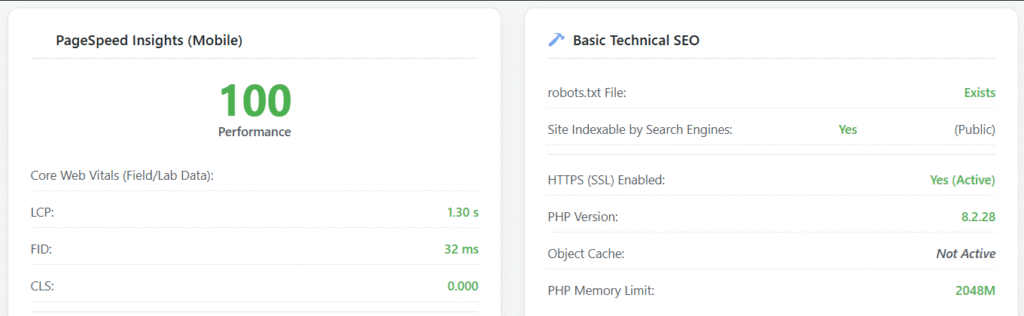
2. Building a Logical Site Architecture
A well-organized website structure works like a pyramid. Your homepage sits at the very top. Major categories branch out directly below it, while individual posts and pages form the broad base. This logical hierarchy creates a better user experience. It also makes your site much easier for search engines to crawl efficiently.
You reinforce this strong architecture with a smart internal linking strategy. For example, every new article should connect to other relevant content on your site. Furthermore, you should update older posts to link to your new content. This practice builds a web of connections that distributes authority and prevents “orphan pages” that search engines can’t find.
SEO Magic Tip: Manually finding relevant older posts to link from is incredibly time-consuming. The Link Assistant (PRO) feature automates this entire process. As you write, it analyzes your text and suggests relevant internal and external links directly within the editor. This helps you build a powerful site structure without the tedious manual effort.
3. Optimizing for Page Speed and Core Web Vitals
In today’s fast-paced world, site speed is a critical ranking factor. Visitors will abandon a slow-loading website in seconds. This behavior sends negative signals to search engines. To quantify this experience, Google developed Core Web Vitals (CWV). These specific metrics measure loading performance, interactivity, and visual stability, directly impacting your site’s health score.
- Largest Contentful Paint (LCP): How long does it take for the main content to load?
- First Input Delay (FID) / Interaction to Next Paint (INP): How long does it take for the site to respond when a user clicks?
- Cumulative Layout Shift (CLS): Does the page jump around as it loads?
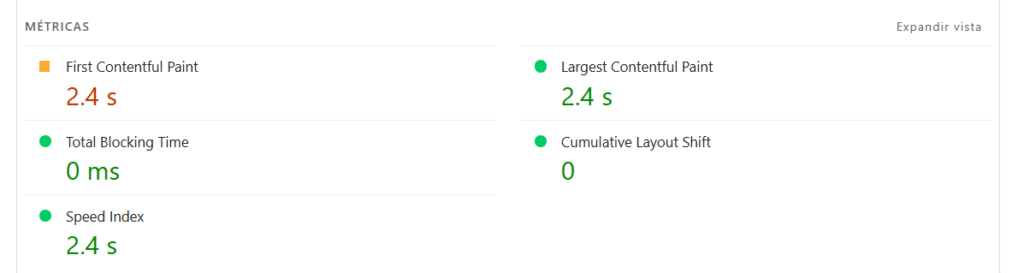
SEO Magic Tip: You do not need to be a developer to diagnose speed problems. The Site Health Audit (PRO) connects directly to the Google PageSpeed Insights API. It conducts a full audit and provides a simple 0-100 score on your Core Web Vitals, along with a prioritized list of actionable fixes.
4. Embracing a Mobile-First Design
A mobile-friendly website is no longer optional; it is essential. Google now uses “mobile-first indexing” for ranking. This means it primarily evaluates the mobile version of your site to determine its position in search results. Therefore, if your site is difficult to use on a phone, your visibility will suffer on all devices.
SEO Magic Tip: The same Site Health Audit (PRO) that checks your PageSpeed also reports on mobile-friendliness. This gives you a complete performance overview of your site on any device, ensuring you meet Google’s modern standards.
5. Leveraging Schema Markup for Rich Results
Schema markup is a form of structured data, often using `JSON-LD`. You add this code to your site to help search engines understand your content more deeply. It goes beyond telling Google what your content *says* and explicitly defines what it *is*. For example, you can identify an article, a recipe, or an event.
- Is this an
Article? - Is this a
Recipewith ingredients and cook times? - Is this an
FAQPagewith questions and answers? - Is this a
LocalBusinesswith an address and phone number?
Implementing Schema correctly can help you earn “Rich Snippets” in search results. These enhanced listings include elements like star ratings, FAQ dropdowns, and product prices. Consequently, they make your website stand out from the competition and can dramatically increase your click-through rate.
SEO Magic Tip: Writing Schema code by hand is complex and highly prone to errors. The Smart Schema Generator (PRO) automates this task. It analyzes your content and enables you to instantly generate and insert the correct Schema (e.g., `Article`, `Recipe`, `FAQPage`) with just a few clicks.
6. Securing Your Site with HTTPS and Clean URLs
Two final, yet crucial, elements build trust with both users and search engines. First, a secure site using HTTPS encrypts visitor data and is a confirmed ranking signal. Second, clean and descriptive URLs help people understand a page’s topic before they even click. This improves both usability and overall SEO performance.
- HTTPS: Your site must use SSL (have a padlock in the URL bar). It’s a key trust signal for users and Google. The Site Health Audit (PRO) checks this.
- Canonical URLs: If you have multiple pages with similar content (e.g., product variations), a “canonical tag” tells Google which version is the “main” one to index. This prevents duplicate content penalties.
Bringing It All Together: Your Path to Technical Excellence
Technical SEO might seem complex, but at its heart, it’s about one thing: removing the barriers between your brilliant content and the audience that needs it. You’ve put in the hard work creating something valuable. Now, it’s time to build a flawless technical foundation so your voice can finally be heard clearly. By making your site fast, secure, and simple for Google to understand, you’re not just checking boxes—you’re paving the way for sustainable growth.
Don’t let technical hurdles dim your shine any longer. Take the first step towards unlocking your site’s true potential. Explore the powerful diagnostic tools in SEO Magic PRO and transform your website from an invisible asset into a search engine powerhouse. Your audience is waiting for you.
Unlock Your SEO Potential: Technical SEO FAQs
What is Technical SEO and why is it important?
Technical SEO involves optimizing your website’s infrastructure. This helps search engines like Google effectively find, crawl, and index your site. It is crucial because it forms the foundation for your content to thrive, ensuring search engines can access and understand it.
How can I improve my website’s crawling and indexing?
First, submit an XML sitemap to Google Search Console. Next, use a robots.txt file to guide crawlers. Finally, ensure your important pages are set to ‘index’ and not ‘noindex’. Many SEO plugins can automate sitemap generation for you.
Why is site speed important for SEO, and how can I improve it?
Site speed is a major ranking factor because it heavily impacts user experience. Google measures it using Core Web Vitals. You can improve speed by optimizing images, using browser caching, and employing a Content Delivery Network (CDN). Tools like Google PageSpeed Insights help diagnose specific issues.